
HTTP 中的 ETag 是如何生成的?
1. 前言
之前介绍了浏览器缓存机制。 本文将介绍如何利用 ETag 和 If-None-Match 来实现缓存控制。 此外,还将介绍 HTTP 中的 ETag 是如何生成的。
2. ETag 简介
2.1 ETag 是什么
ETag(Entity Tag)是万维网协议 HTTP 的一部分。 它是 HTTP 协议提供的若干机制中的一种 Web 缓存验证机制,并且允许客户端进行缓存协商。 这使得缓存变得更加高效,而且节省带宽。 如果资源的内容没有发生改变,Web 服务器就不需要发送一个完整的响应。
2.2 ETag 的作用
ETag 是一个不透明的标识符,由 Web 服务器根据 URL 上的资源的特定版本而指定。 如果 URL 上的资源内容改变,一个新的不一样的 ETag 就会被生成。 ETag 可以看成是资源的指纹,它们能够被快速地比较,以确定两个版本的资源是否相同。
需要注意的是
ETag的比较只对同一个URL有意义 ———— 不同URL上资源的ETag值可能相同也可能不同,具体以Web服务器实现而定。
2.3 ETag 的语法
ETag: W/"<etag_value>"
ETag: "<etag_value>"W/(可选):'W/'(大小写敏感)表示使用弱验证器。弱验证器很容易生成,但不利于比较。 强验证器是比较的理想选择,但很难有效地生成。 相同资源的两个弱
Etag值可能语义等同,但不是每个字节都相同。"<etag_value>":实体标签唯一地表示所请求的资源。它们是位于双引号之间的
ASCII字符串(如 “2c-1799c10ab70” )。 没有明确指定生成ETag值的方法。 通常是使用内容的散列、最后修改时间戳的哈希值或简单地使用版本号。比如,MDN使用wiki内容的十六进制数字的哈希值。
2.4 ETag 的使用
在大多数场景下,当一个 URL 被请求,Web 服务器会返回资源和其相应的 ETag 值,它会被放置在 HTTP 响应头的 ETag 字段中:
HTTP/1.1 200 OK
Content-Length: 44
Cache-Control: max-age=10
Content-Type: application/javascript; charset=utf-8
ETag: W/"2c-1799c10ab70"
然后,客户端可以决定是否缓存这个资源和它的 ETag。 以后,如果客户端想再次请求相同的 URL,将会发送一个包含已保存的 ETag 和 If-None-Match 字段的请求:
GET /index.js HTTP/1.1
Host: localhost:3000
Connection: keep-alive
If-None-Match: W/"2c-1799c10ab70"
客户端请求之后,服务器可能会比较客户端的 ETag 和当前版本资源的 ETag。 如果 ETag 值匹配,这就意味着资源没有改变,服务器便会发送回一个极短的响应,包含 HTTP “304 未修改” 的状态。 304 状态码告诉客户端,它的缓存版本是最新的,可以直接使用它:
HTTP/1.1 304 Not Modified
Cache-Control: max-age=10
ETag: W/"2c-1799c10ab70"
Connection: keep-alive
3. ETag 实战
3.1 创建 Koa 服务器
接下来我们将基于 koa、koa-conditional-get、koa-etag 和 koa-static 这些库来介绍一下,在实际项目中如何利用 ETag 响应头和 If-None-Match 请求头实现资源的缓存控制。
// package.json

{
  "scripts": {
    "start": "node server.js"
  },
  "dependencies": {
    "koa": "^2.13.1",
    "koa-conditional-get": "^3.0.0",
    "koa-etag": "^4.0.0",
    "koa-static": "^5.0.0"
  },
  "devDependencies": {
    "nodemon": "^2.0.7"
  }
}// server.js
const path = require('node:path');
const Koa = require('koa');
const conditional = require('koa-conditional-get');
const etag = require('koa-etag');
const koaStatic = require('koa-static');
const app = new Koa();
app.use(conditional()); // 使用条件请求中间件
app.use(etag()); // 使用etag中间件
app.use(
// 使用静态资源中间件
koaStatic(path.join(__dirname, '/public'), {
maxage: 10 * 1000, // 设置缓存存储的最大周期,单位为秒
})
);
app.listen(3000, () => {
console.log('app starting at port 3000');
});引入中间件说明:
koa-conditional-get:对于未更新的资源返回304,默认资源过期后再次请求返回的是200。koa-etag:静态资源响应生成 ETag;
综上,只有这两个中间件结合使用,才会实现我们想要的效果。下文会详细介绍其实现。
在以上代码中,我们使用了 koa-static 中间件来处理静态资源,这些资源被保存在 public 目录下。 在该目录下,我们创建了 index.html 和 index.js 两个资源文件,文件中的内容分别如下所示:
<!-- public/index.html -->

<!doctype html>
<html lang="zh-cn">
  <head>
    <meta charset="UTF-8" />
    <meta http-equiv="X-UA-Compatible" content="IE=edge" />
    <meta name="viewport" content="width=device-width, initial-scale=1.0" />
    <title>ETag 使用示例</title>
    <script src="./index.js"></script>
  </head>
  <body>
    <h3>ETag 使用示例</h3>
  </body>
</html>// public/index.js
console.log('Hello World!');然后启动服务器:
node server.js
# 或者
npx nodemon server.js
# 或者
npm start
# 或者
npm run start
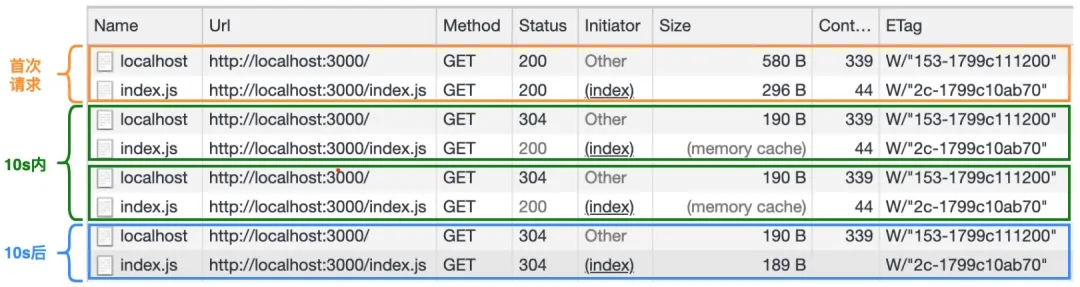
在启动完服务器之后,我们打开 Chrome 开发者工具并切换到 Network 标签栏,然后在浏览器地址栏输入 http://localhost:3000/ 地址,接着多次访问该地址(地址栏多次回车)。下图是多次访问的结果:
3.2 ETag 和 If-None-Match
下面我们将以 index.js 为例,来分析上图中与之对应的 HTTP 报文。
对于
index.html文件,这里就不具体分析了。只要知道,html文件不会强制缓存,只会协商缓存即可。
3.2.1 首次请求报文
General:
Request URL: http://localhost:3000/
Request Method: GET
Status Code: 200 OK
Request Headers:
GET / HTTP/1.1
Host: localhost:3000
Connection: keep-alive
Pragma: no-cache
Cache-Control: no-cache
Response Headers:
HTTP/1.1 200 OK
Content-Length: 383
Last-Modified: Thu, 03 Jun 2021 03:30:43 GMT
Cache-Control: max-age=10
Content-Type: text/html; charset=utf-8
ETag: W/"17f-179cfec57a9"
Date: Thu, 03 Jun 2021 04:15:36 GMT
Connection: keep-alive
在使用了 koa-static 和 koa-etag 中间件之后,index.js 文件首次请求的响应报文中会包含 Cache-Control 和 ETag 的字段信息。
Cache-Control描述的是一个相对时间,在进行缓存命中的时候,都是利用客户端时间进行判断。 所以相比较Expires,Cache-Control的缓存管理更有效,安全一些。
3.2.2 10s 内请求报文
General:
Request URL: http://localhost:3000/index.js
Request Method: GET
Status Code: 200 OK (from memory cache)
Request Headers:
GET /index.js HTTP/1.1
Host: localhost:3000
Connection: keep-alive
Pragma: no-cache
Cache-Control: no-cache
Response Headers:
Cache-Control: max-age=10
Connection: keep-alive
Content-Length: 48
Content-Type: application/javascript; charset=utf-8
Date: Thu, 03 Jun 2021 04:15:36 GMT
ETag: W/"30-179cff082eb"
Last-Modified: Thu, 03 Jun 2021 03:35:16 GMT
由于我们设置了 index.js 资源文件的最大缓存时间为 10s,所以在 10s 内浏览器会直接从缓存中读取文件的内容。 需要注意的是,此时的状态码为:Status Code: 200 OK (from memory cache)。
3.2.3 10s 后请求报文
General:
Request URL: http://localhost:3000/index.js
Request Method: GET
Status Code: 304 Not Modified
Request Headers:
GET /index.js HTTP/1.1
Host: localhost:3000
Connection: keep-alive
sec-ch-ua: " Not A;Brand";v="99", "Chromium";v="90", "Google Chrome";v="90"
If-None-Match: W/"30-179cff082eb"
If-Modified-Since: Thu, 03 Jun 2021 03:35:16 GMT
因为 10s 之后,缓存已经过期了,而且在 index.js 文件首次请求的响应报文中也返回了 ETag 字段。 所以此时浏览器会发起 If-None-Match 条件请求。 这类请求可以用来验证缓存的有效性,省去不必要的控制手段。
Response Headers:
HTTP/1.1 304 Not Modified
Last-Modified: Thu, 03 Jun 2021 03:35:16 GMT
Cache-Control: max-age=10
ETag: W/"30-179cff082eb"
Date: Thu, 03 Jun 2021 04:26:24 GMT
Connection: keep-alive
因为文件的内容未发生改变,所以 10s 后的响应报文的状态码为 304 Not Modified。 此外,响应报文中也返回了 ETag 字段。
接下来,我们介绍下
koa-conditional-get和koa-etag是如何实现的。
4. koa-conditional-get 源码解析
在前面的示例中,我们使用了 koa-conditional-get 中间件来实现资源的协商缓存生效。 原因是对资源新鲜度做了 304 返回的处理。
这里资源新鲜,指的是浏览器缓存的资源是最新的资源的意思。
该中间件的实现,具体如下所示:
module.exports = function conditional() {
  return async function (ctx, next) {
    await next();

    if (ctx.fresh) {
      ctx.status = 304;
      ctx.body = null;
    }
  };
};
那么 ctx.fresh 是如何处理的?
可以看到 Koa 在 request 中的 fresh 方法如下:
// node_modules/koa/lib/request.js

module.exports = {
  // ...

  get fresh() {
    const method = this.method;
    const s = this.ctx.status;

    // GET or HEAD for weak freshness validation only
    if (method !== 'GET' && method !== 'HEAD') {
      return false;
    }

    // 2xx or 304 as per rfc2616 14.26
    if ((s >= 200 && s < 300) || s === 304) {
      return fresh(this.header, this.response.header);
    }

    return false;
  },

  // ...
};
状态码 200-300 之间以及 304 调用 fresh 方法,判断该请求的资源是否新鲜。
fresh 方法源码:
// node_modules/fresh/index.js

const CACHE_CONTROL_NO_CACHE_REGEXP = /(?:^|,)\s*no-cache\s*(?:,|$)/;

module.exports = fresh;

function fresh(reqHeaders, resHeaders) {
  // fields
  const modifiedSince = reqHeaders['if-modified-since'];
  const noneMatch = reqHeaders['if-none-match'];

  // unconditional request
  if (!modifiedSince && !noneMatch) {
    return false;
  }

  // Always return stale when Cache-Control: no-cache
  // to support end-to-end reload requests
  // https://tools.ietf.org/html/rfc2616#section-14.9.4
  const cacheControl = reqHeaders['cache-control'];
  if (cacheControl && CACHE_CONTROL_NO_CACHE_REGEXP.test(cacheControl)) {
    return false;
  }

  // if-none-match
  if (noneMatch && noneMatch !== '*') {
    const etag = resHeaders.etag;

    if (!etag) {
      return false;
    }

    let etagStale = true;
    const matches = parseTokenList(noneMatch);
    for (let i = 0; i < matches.length; i++) {
      const match = matches[i];
      if (match === etag || match === `W/${etag}` || `W/${match}` === etag) {
        etagStale = false;
        break;
      }
    }

    // 不新鲜资源,则返回false
    if (etagStale) {
      return false;
    }
  }

  // if-modified-since
  if (modifiedSince) {
    const lastModified = resHeaders['last-modified'];
    const modifiedStale = !lastModified || !(parseHttpDate(lastModified) <= parseHttpDate(modifiedSince));

    // 不新鲜资源,则返回false
    if (modifiedStale) {
      return false;
    }
  }

  return true;
}

// 将字符串日期格式转为日期对象
function parseHttpDate(date) {
  const timestamp = date && Date.parse(date);

  // istanbul ignore next: guard against date.js Date.parse patching
  return typeof timestamp === 'number' ? timestamp : Number.NaN;
}

// 获取请求头 ETag: W/"2c-1799c10ab70" 的值 W/"2c-1799c10ab70",这里兼容了返回多个ETag以逗号或者空格分隔的情况。
function parseTokenList(str) {
  let end = 0;
  const list = [];
  let start = 0;

  // gather tokens
  for (let i = 0, len = str.length; i < len; i++) {
    switch (str.charCodeAt(i)) {
      case 0x20 /*   */:
        if (start === end) {
          start = end = i + 1;
        }
        break;
      case 0x2C /* , */:
        list.push(str.substring(start, end));
        start = end = i + 1;
        break;
      default:
        end = i + 1;
        break;
    }
  }

  // final token
  list.push(str.substring(start, end));

  return list;
}
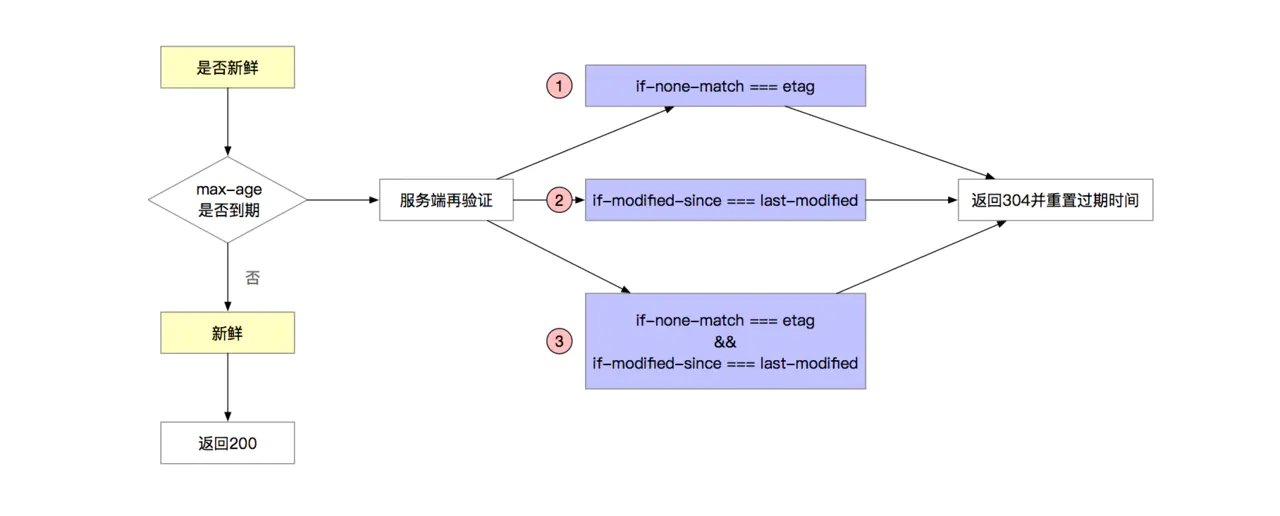
fresh 的代码判断逻辑总结如下,满足 3 种条件之一,fresh 为 true。
5. koa-etag 源码解析
在前面的示例中,我们使用了 koa-etag 中间件来实现资源的缓存控制。
该中间件的实现,具体如下所示:
// node_modules/koa-etag/index.js

const Stream = require('node:stream');
const calculate = require('etag');
const promisify = require('node:util').promisify;
const fs = require('node:fs');
const Buffer = require('node:buffer').Buffer;

const stat = promisify(fs.stat);

module.exports = function etag(options) {
  return async function etag(ctx, next) {
    await next();
    const entity = await getResponseEntity(ctx);
    setEtag(ctx, entity, options);
  };
};

async function getResponseEntity(ctx) {
  // no body
  const body = ctx.body;
  if (!body || ctx.response.get('etag')) {
    return;
  }

  // type
  const status = (ctx.status / 100) | 0; // 小数取整

  // 仅 2xx 校验通过
  if (status !== 2) {
    return;
  }

  if (body instanceof Stream) {
    if (!body.path) {
      return;
    }
    return await stat(body.path);
  }
  else if (typeof body === 'string' || Buffer.isBuffer(body)) {
    return body;
  }
  else {
    return JSON.stringify(body);
  }
}

function setEtag(ctx, entity, options) {
  if (!entity) {
    return;
  }

  ctx.response.etag = calculate(entity, options);
}
由以上代码可知,在 koa-etag 中间件内部会先通过 getResponseEntity 函数来获取响应实体对象,然后再调用 setETag 函数来生成 ETag。 而 setETag 函数的实现很简单,在 setETag 函数内部,会通过 etag 这个第三方库来生成 ETag。
etag 这个库对外提供了一个 etag 函数来创建 ETag,该函数的签名如下:
etag(entity, [options]);entity:用于生成ETag的实体,类型支持Strings,Buffers和fs.Stats。除了fs.Stats对象之外,默认将生成strong ETag。options:配置对象,支持通过options.weak属性来配置生成weak ETag。
了解完 etag 函数的参数之后,我们来看一下该函数的具体实现:
// node_modules/etag/index.js

const crypto = require('node:crypto');
const Stats = require('node:fs').Stats;
const Buffer = require('node:buffer').Buffer;

const toString = Object.prototype.toString;

module.exports = etag;

function etag(entity, options) {
  if (entity == null) {
    throw new TypeError('argument entity is required');
  }

  // support fs.Stats object
  const isStats = isstats(entity);
  const weak = options && typeof options.weak === 'boolean' ? options.weak : isStats;

  // validate argument
  if (!isStats && typeof entity !== 'string' && !Buffer.isBuffer(entity)) {
    throw new TypeError('argument entity must be string, Buffer, or fs.Stats');
  }

  // generate entity tag
  const tag = isStats ? stattag(entity) : entitytag(entity);

  return weak ? `W/${tag}` : tag;
}

function isstats(obj) {
  // genuine fs.Stats
  if (typeof Stats === 'function' && obj instanceof Stats) {
    return true;
  }

  // quack quack
  return (
    obj
    && typeof obj === 'object'
    && 'ctime' in obj
    && toString.call(obj.ctime) === '[object Date]'
    && 'mtime' in obj
    && toString.call(obj.mtime) === '[object Date]'
    && 'ino' in obj
    && typeof obj.ino === 'number'
    && 'size' in obj
    && typeof obj.size === 'number'
  );
}
在 etag 函数内部会根据 entity 的类型,执行不同的生成逻辑。
如果 entity 是 fs.Stats 对象,则会调用 stattag 函数来创建 ETag。
// node_modules/etag/index.js

function stattag(stat) {
  const mtime = stat.mtime.getTime().toString(16);
  const size = stat.size.toString(16);

  return `"${size}-${mtime}"`;
}
而如果 entity 参数非 fs.Stats 对象,则会调用 entitytag 函数来生成 ETag。其中 entitytag 函数的具体实现如下:
// node_modules/etag/index.js

const Buffer = require('node:buffer').Buffer;

function entitytag(entity) {
  if (entity.length === 0) {
    // fast-path empty
    return '"0-2jmj7l5rSw0yVb/vlWAYkK/YBwk"';
  }

  // compute hash of entity
  const hash = crypto.createHash('sha1').update(entity, 'utf8').digest('base64').substring(0, 27);

  // compute length of entity
  const len = typeof entity === 'string' ? Buffer.byteLength(entity, 'utf8') : entity.length;

  return `"${len.toString(16)}-${hash}"`;
}
对于非 fs.Stats 对象来说,在 entitytag 函数内部会使用 sha1 消息摘要算法来生成 hash 值并以 base64 格式输出,而实际的生成的 hash 值会取前 27 个字符。此外,由以上代码可知,最终的 ETag 将由实体的长度和哈希值两部分组成。
需要注意的是,生成 ETag 的算法并不是固定的,通常是使用内容的散列、最后修改时间戳的哈希值或简单地使用版本号。
6. ETag vs Last-Modified
其实除了 ETag 字段之外,大多数情况下,响应头中还会包含 Last-Modified 字段。它们之间的区别如下:
精确度上,
Etag要优于Last-Modified。Last-Modified的时间单位是秒,如果某个文件在 1 秒内被改变多次,那么它们的Last-Modified并没有体现出来修改,但是Etag每次都会改变,从而确保了精度; 此外,如果是负载均衡的服务器,各个服务器生成的Last-Modified也有可能不一致。性能上,
Etag要逊于Last-Modified。毕竟
Last-Modified只需要记录时间,而ETag需要服务器通过消息摘要算法来计算出一个hash值。优先级上,在资源新鲜度校验时,服务器会优先考虑
Etag。即如果条件请求的请求头同时携带
If-Modified-Since和If-None-Match字段,则会优先判断资源的ETag值是否发生变化。